Put tvOS Browser on your Apple TV.
Because the browser uses private Apple APIs, it isn't on the App Store. Instead, you build it with Xcode and install it straight onto your own Apple TV. It's free, and this guide takes you through every step.
What you need
Check first- A Mac with Xcode 27 or later, free from the Mac App Store.
- An Apple TV running tvOS 26 or later, on the same Wi-Fi or network as the Mac.
- An Apple ID. A free one works; see how long an install lasts.
Download the code
1 minPick whichever is easier for you:
Then open the project in Xcode by double-clicking _Project/Browser.xcodeproj, or from Terminal:
open AppleTVBrowser/_Project/Browser.xcodeprojAppleTVBrowser-master.
Add your Apple ID to Xcode
1 min- In Xcode, open Xcode → Settings (or press ⌘ ,).
- Go to the Accounts tab.
- Click +, choose Apple Account, and sign in.
Pair your Apple TV with your Mac
2 min- On the Apple TV, open Settings → Remotes and Devices → Remote App and Devices, and stay on that screen.
- On the Mac, open Window → Devices and Simulators in Xcode. Your Apple TV appears under Discovered.
- Click Pair and type in the code shown on your TV.
Turn on Developer Mode
2 minIf the Apple TV asks for it after pairing, open Settings → Privacy & Security → Developer Mode on the TV, turn it on, and let the Apple TV restart. If it doesn't ask, it's already on and you can skip this step.
Set up signing
2 minApple only installs apps that are signed. Xcode does this for you; it just needs to know who you are.
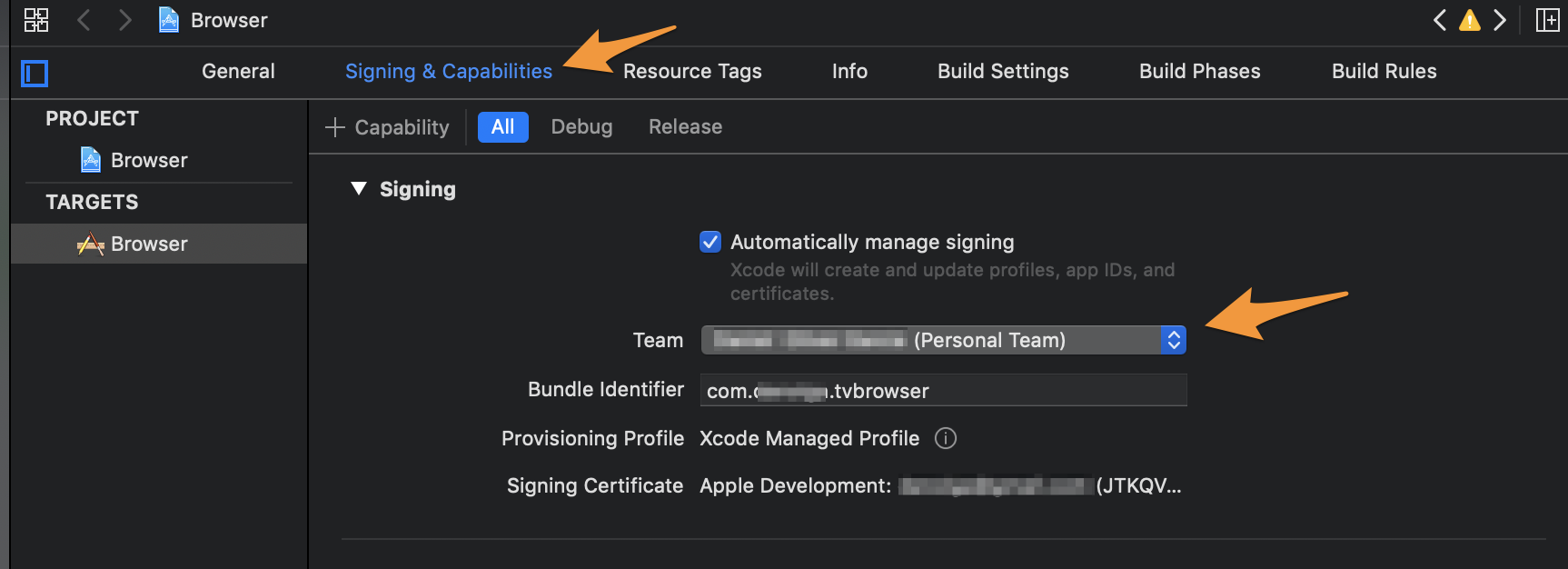
- In Xcode's left sidebar, click the blue Browser project, then select the Browser target.
- Open the Signing & Capabilities tab.
- Keep Automatically manage signing checked and choose your name under Team.
- Change Bundle Identifier to something unique to you, for example
com.yourname.tvbrowser.
Build and run
2 min- At the top of the Xcode window, open the run destination menu and choose your Apple TV.
- Press ⌘ R, or click the ▶ button.
The first build takes a minute or two. When it's done, tvOS Browser opens on your TV and stays on the Apple TV home screen.
First launch
You're done- Move the cursor by swiping on the remote's touch surface, and click to open links.
- Double-click the touch surface to switch to scroll mode for long pages.
- Press Play/Pause to type a web address or search.
- Double-press Play/Pause for the side menu: tabs, favorites, history and settings.
- To watch a video full screen, press the full-screen button in the site's player. Want every video to open full screen when you click it? Turn on Side Menu → Video Playback → Enable Full Screen player.
- The ad blocker is already on. It takes a few seconds to prepare its rules on the very first launch.
Prefer the command line?
OptionalAfter steps 2 to 5, you can build and install without opening Xcode again. In Terminal, inside the AppleTVBrowser folder, find your Apple TV's identifier:
xcrun devicectl list devicesThen build and install, replacing the placeholders:
xcodebuild -project _Project/Browser.xcodeproj -scheme Browser -configuration Release \
  -destination 'platform=tvOS,name=<Your Apple TV name>' \
  -derivedDataPath _Project/build -allowProvisioningUpdates build

xcrun devicectl device install app --device <device identifier> \
_Project/build/Build/Products/Release-appletvos/Browser.appHow long the app keeps working
Good to knowUpdating to a new version
2 minIf you cloned with Git, pull the latest code; if you used the ZIP, download it again. Then build and run as in step 6.
git pullThe ad-blocking filter lists ship with the app. To refresh them with the latest versions before building:
_Project/Scripts/update-content-blockers.shTroubleshooting
If needed- The app no longer opens. With a free Apple ID, the 7-day signature has expired. Run it from Xcode again.
- The Apple TV doesn't show up in Xcode. Check both devices are on the same network, and keep the TV on the Remote App and Devices screen while pairing.
- Xcode shows a signing error. Make sure a Team is selected and the Bundle Identifier is unique to you.
- "Native Video Unavailable". The page didn't hand over a stream the native player can open. Start the video in the page first, then press its full-screen button.
- A site looks broken. Turn off the ad blocker for a moment (Side Menu → Content Blocking), or switch between desktop and mobile mode.
Still stuck? Open an issue on GitHub.